
Block apps and websites on iPhone and Mac Sessions, schedules and blocklists sync across iPhone and Mac System-wide website blocking on Mac across Safari, Chrome and Arc Super Strict Mode - a running session cannot be paused, stopped or edited Scheduled sessions that start themselves Daily usage limits that block an app for the rest of the day
What the scroll costs
Eleven years, at the going rate.
None of it was a decision. It went while you were deciding something else, four and a half hours at a time. That is the number bloq is built to take back.
150
pickups a day
4.5h
daily screen time, on average
11 yrs
of a lifetime, at that rate
The other side of the lock
This is what the hours are for.
bloq is not about the thing you stop doing. It is about the thing that finally gets the time.





Plainly
What is bloq?
bloq is an app blocker for iPhone and Mac. It locks distracting apps and websites for the length of a focus session, and with Super Strict Mode running you cannot pause the timer, stop the session, edit the block list, or even delete the app. Sessions sync across your devices, so blocking on one blocks on both.
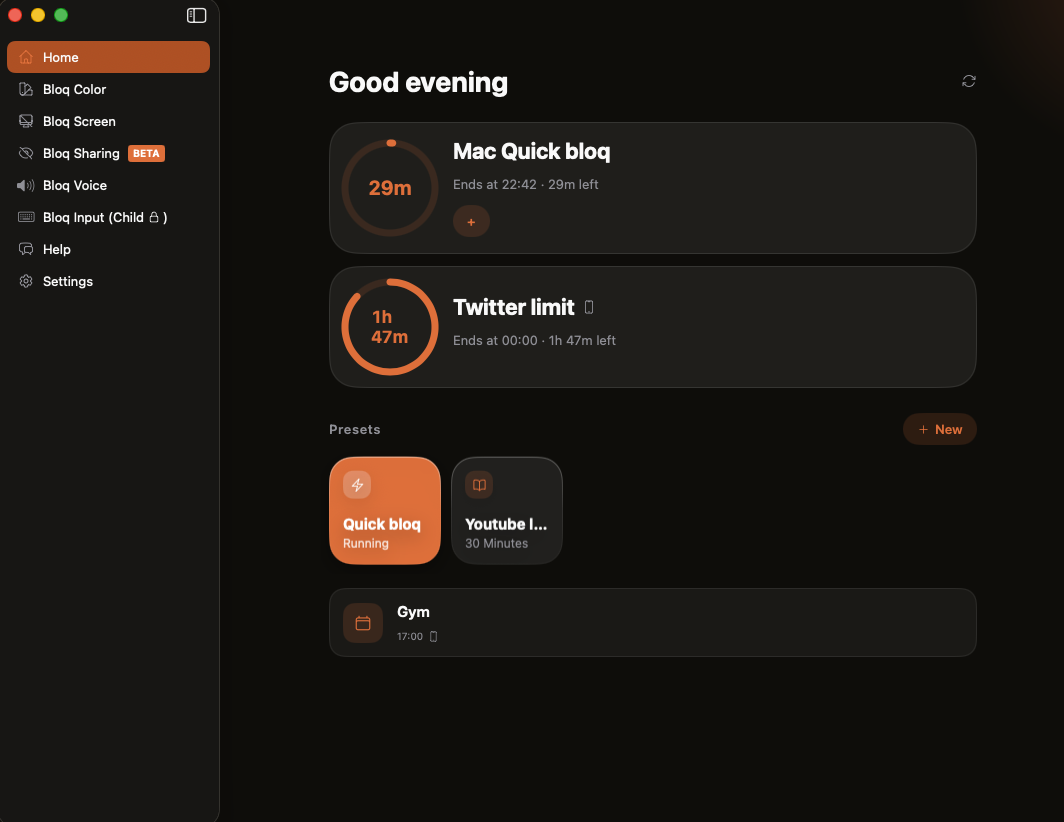
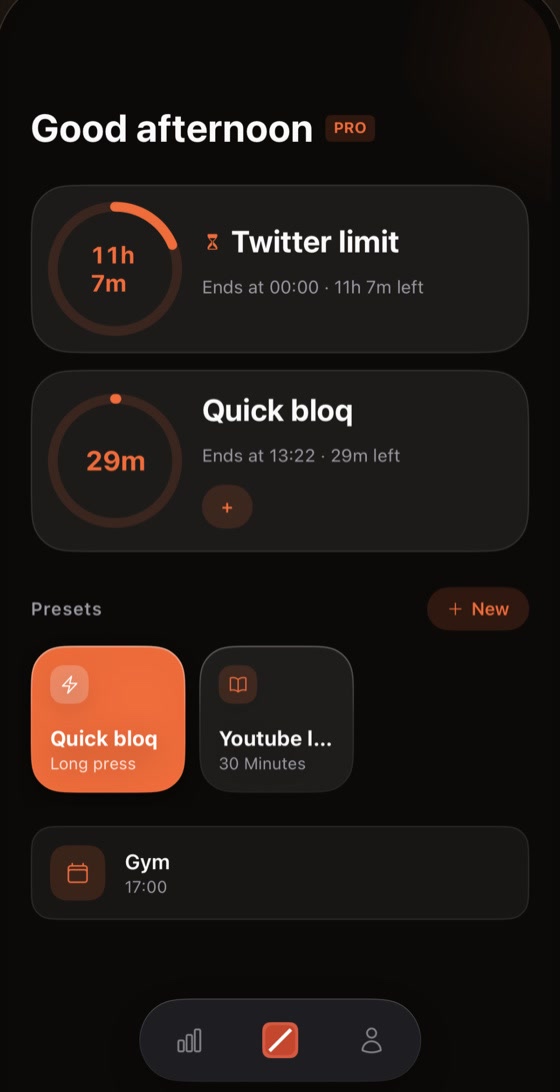
iPhone + Mac, in sync
Locked on one, locked on both.
Sessions, schedules and blocklists stay in sync through your account. Close the laptop and the phone is already bloqed. End the session and every screen lets you back at once.
How it holds
Every excuse, handled.
A blocker you can talk your way out of is a suggestion. Here is what happens when you try.
“I only need 30 minutes.”
Daily limits: 30 minutes means 30 minutes. After that, the app is bloqed until midnight.
“I’ll use my Mac instead.”
The moment your iPhone bloqs, your Mac bloqs with it. Sessions sync both ways, automatically.
“I’ll open another browser.”
On Mac, websites are blocked system-wide. Safari, Chrome, Arc, all of them.
“Just five more minutes.”
There is no snooze button. A bloq ends when the timer ends, not when the craving does.
“I’ll start tomorrow.”
Schedules start sessions for you. Tomorrow starts itself, and you don’t get a say anymore.
“I’ll just quit the app.”
Super Strict Mode keeps the session running. You can’t end it early, and you can’t even delete the app.
Only on Mac
The Mac comes loaded.
Five extras that ship with bloq Mac. No add-ons, no extra cost.
bloq Screen
Full-screen eye breaks on your schedule. Look at something 20 feet away until the countdown ends. It pauses itself when you step away.
bloq Color
Grayscale on a schedule. Feeds are engineered to be colorful. Turn the color off at night and watch the pull fade with it.
bloq Voice
A live voice changer for your Mac’s audio. Pick a preset, nudge the pitch, and whatever is playing comes out transformed in real time.
bloq Input (Child Lock)
Locks the keyboard and trackpad so small hands can watch without wrecking anything. Hold both Shift keys to unlock.
bloq Sharing BETA
The moment screen sharing starts, the apps and websites you picked get masked. What’s yours stays yours.
More coming soon
The shelf keeps growing. New goodies land in free updates.

Help Center
Frequently asked questions
Bloq Screen (Mac)
The eye-break screen is stuck / how do I skip a break?
You can skip any eye break by double-pressing the Esc key (two quick presses within half a second). The break screen also protects itself: a built-in failsafe force-closes it 2 seconds after your set break duration ends, even if something goes wrong, so a stuck break screen clears itself within seconds. If you ever see it stay up longer than that, make sure you're on the latest version of bloq Mac.
Cross-Device Sync
I started a session on another device but my iPhone apps aren't blocked. Why?
When a session starts on another device (like your Mac), your iPhone is woken by a silent notification to apply the block. iOS only delivers these wake-ups if Background App Refresh is on: go to Settings > General > Background App Refresh and make sure it's enabled both globally and for bloq. Also note that iOS never wakes an app you've force-quit (swiped away in the app switcher), and Low Power Mode can delay wake-ups. Opening bloq always syncs and applies the block immediately.
Getting Started
How do I block apps and websites?
Create a block list from the Block Lists tab (tap '+', name it, and pick the apps and websites to restrict), then start a focus session from the Focus tab with that list selected. While the session runs, blocked apps and sites are redirected back to bloq. See the full guide on bloq.ac for step-by-step screenshots.
Limits
How do usage limits work?
A limit session watches how long you use the selected apps and websites each day. Once you pass your daily allowance (for example 30 minutes), they're bloqed for the rest of the day, until midnight. The counter resets every day at midnight. On Mac, time counts while the app or website is active in front of you; on iPhone, Screen Time does the counting.
Super Strict Mode
What does Super Strict Mode do?
Super Strict Mode prevents you from ending a focus session early: you can't pause the timer, stop the session, or edit the active block list until the timer completes. Enable it with the Super Strict Mode toggle before starting a session. Use it wisely, since it can't be disabled mid-session.
I can't delete apps after using Super Strict Mode
That was a bug in bloq 1.2.3 and earlier, fixed in 1.2.4. Update bloq and open it once and Delete App comes back. If you can't update yet, go to Settings > Screen Time > Apps With Screen Time Access and turn off bloq, which lifts every bloq restriction. Still stuck? Email support@bloq.ac.
Support
Still have a question?
You can always send a mail to support@bloq.ac. Whether it's a bug report, a billing question, or just feedback, we read everything and get back to you as quickly as we can.
Guides
How to Block Apps on iPhone
Learn how to create your first block list and start blocking distracting apps and websites on your iPhone.
How Super Strict Mode Works
Understand bloq’s Super Strict Mode feature and how it helps you maintain focus by preventing you from disabling blocks.
Newsletter
Stay in the loop
One short email when something ships - new features, focus tips, launch discounts. No spam, unsubscribe anytime.
Subscribe and get an extra month free on the annual plan.