Release notes
What's new in bloq 1.0.8 for Mac
1 SEPTEMBER 2026 · 5 MIN READ
bloq 1.0.8 for Mac adds Bloq Output: send any app's audio to any output device. Chrome to your speakers, Spotify to your headphones, at the same time. No virtual driver, no restart, no system extension.
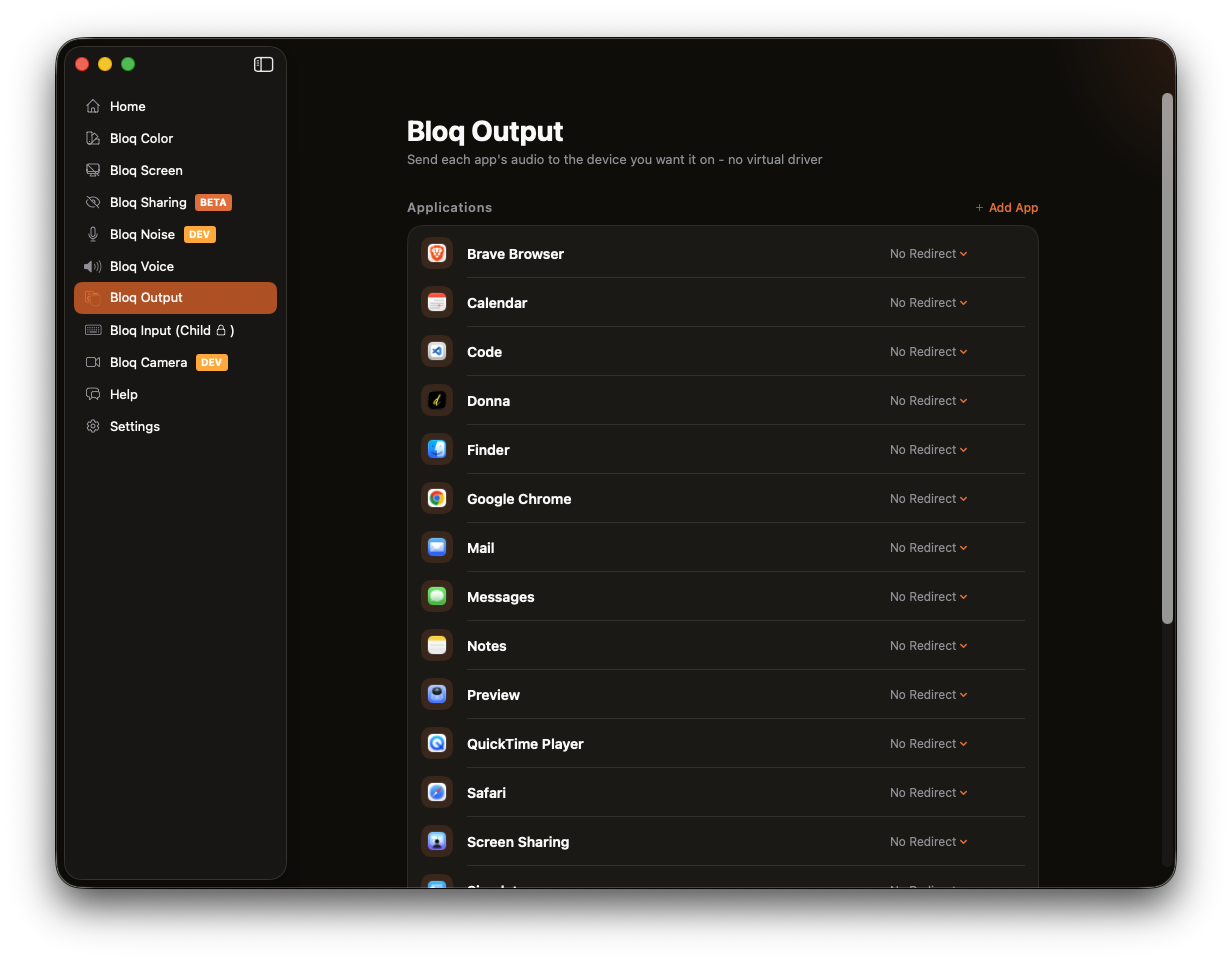
Bloq Output: one app, one device
macOS gives you exactly one output device at a time. Every app shares it. If you want your music on the desk speakers while calls stay in your headset, macOS has no answer for that.
The new Bloq Output tab lists the apps you have open right now, each with a menu of your connected output devices. Pick a device and that app's audio moves there. Everything else keeps using the system output.
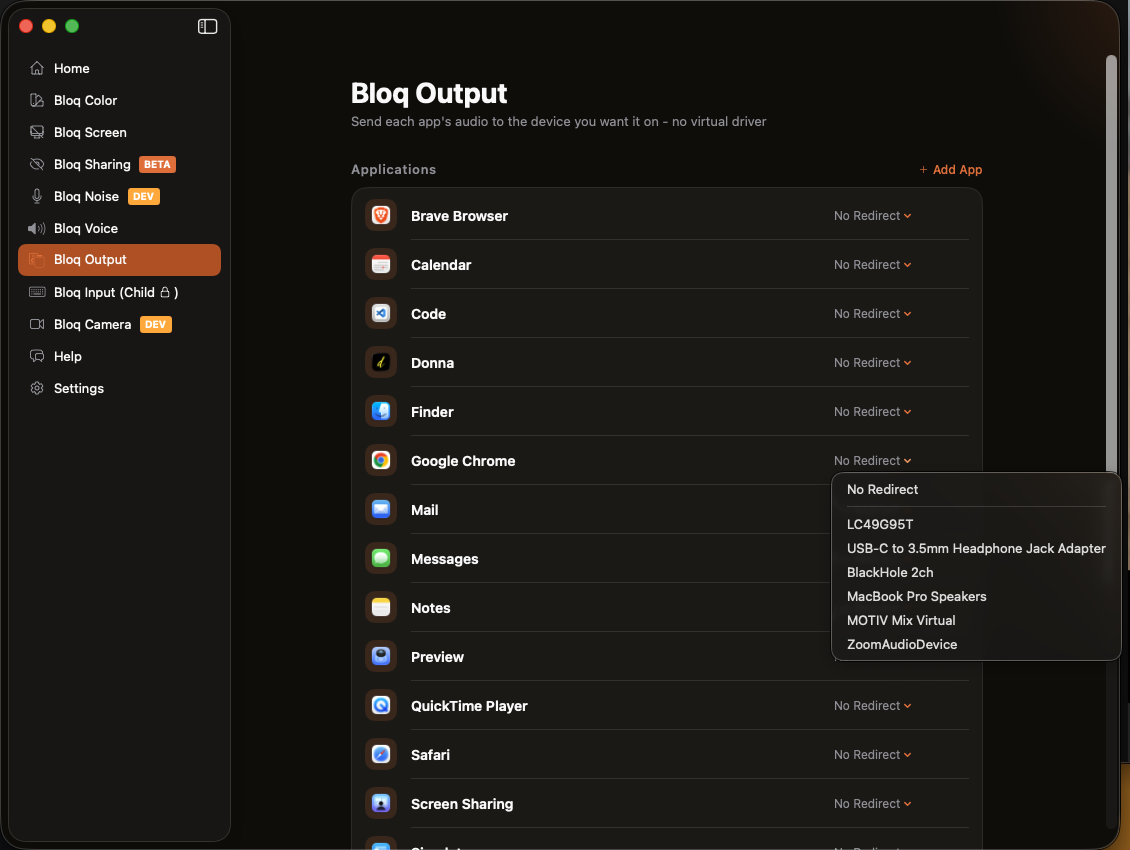
It works by capturing the app's audio at the source, muting the original so you never hear it twice, and replaying it on the device you chose. That is done with the process-tap API macOS itself provides, which means no virtual audio driver gets installed. Nothing to uninstall later, nothing that survives deleting the app, no kernel extension asking you to reboot into recovery mode.
A few details that matter in practice:
- Browsers work properly. Chrome, Brave and Firefox play audio from a helper process rather than the main app. bloq follows those helpers, so routing Chrome actually routes the tab that is playing.
- The list is live. Only apps you currently have open appear. You can pin an installed app to keep it in the list while it is closed, and anything you have since uninstalled is dropped automatically.
- Your choices persist. Routes are remembered per app, so a route you set once holds the next time that app runs.
- AirPlay speakers show up once macOS is connected to one through Control Center, marked so you know to expect a second or two of delay.
What bloq already replaces
Bloq Output is one tab. It landed in an app that already does app and website blocking, schedules, usage limits, screen breaks, voice effects on system audio, and a child lock, across Mac and iPhone.
Bought separately, the closest equivalents on the Mac look like this:
| What it does | Closest paid equivalent | Price |
|---|---|---|
| Blocking, scheduling, recurring sessions, locked mode, across devices | Freedom Forever | $199 |
| Per-app audio routing | SoundSource | $49 |
| Total, one-time | $248 | |
Prices checked 31 August 2026 on each vendor's own purchase page. Freedom's list price for its lifetime plan is $199; it is often discounted, and was on offer at $99.50 the day this was written. Cold Turkey Blocker Pro at $45 is a cheaper Mac-only alternative to Freedom, not an addition to it.
bloq Pro is $39.99 a year. That is roughly a sixth of what the two apps above cost once, and bloq covers your iPhone in the same subscription. There are also monthly ($3.99) and weekly ($1.99) plans, and a free tier that runs two sessions plus Quick bloq with no account charge at all.
Two things we will not pad the list with: bloq's screen-break reminders and grayscale mode have perfectly good free alternatives in Time Out, Stretchly and f.lux. They are worth having in one app next to everything else, but they are not what makes the arithmetic work.
Get bloq 1.0.8
Route any app's audio anywhere, and lock distracting apps and websites on your Mac and iPhone until the session ends.
More coming
Bloq Output is the first of a run of Mac features built on the same audio foundation. Per-app volume is the obvious next step now that the routing works, and Bloq Noise, currently in development, brings noise suppression to your microphone. Every one of them lands in the same subscription, at the same price.
How to update
If you already have bloq on your Mac you do not need to do anything: the app checks for updates on its own and will offer 1.0.8 the next time you open it. To check by hand, open bloq and choose Check for Updates from the menu. The download button above always points at the current release.
Bloq Output needs permission to record system audio, which is how macOS gates capturing another app's sound. bloq asks the first time you set a route, and the tab links straight to the right pane in System Settings if you said no the first time. Until you grant it, nothing is routed and nothing is muted.
FAQ
Does Bloq Output install an audio driver?
No. It uses the process-tap API built into macOS, so there is no virtual device, no system extension and no reboot. Removing bloq removes the feature completely.
Will I hear the audio twice?
No. The original is muted at the source as part of the same operation that captures it, so a routed app plays only on the device you picked. Setting it back to No Redirect unmutes it immediately.
Can I route an app to an AirPlay speaker?
Yes, once macOS is connected to that speaker. AirPlay receivers only become selectable audio devices after you pick them in Control Center, so connect there first and the speaker then appears in bloq's list. Expect a second or two of AirPlay delay.
Does this work while a blocking session is running?
Yes. Bloq Output is independent of sessions and schedules. The one exception is Bloq Voice, which applies effects to everything your Mac plays. Because both work on the same audio, turning on Bloq Voice pauses per-app routing and turning it off resumes it. Your routes are remembered, not discarded.
Is Bloq Output included in the free tier?
Bloq Pro covers the full feature set at $39.99 a year. The free tier gives you Quick bloq and two sessions so you can try bloq before paying.